
Form Builder & documents
Certificates, contracts and forms that fill themselves
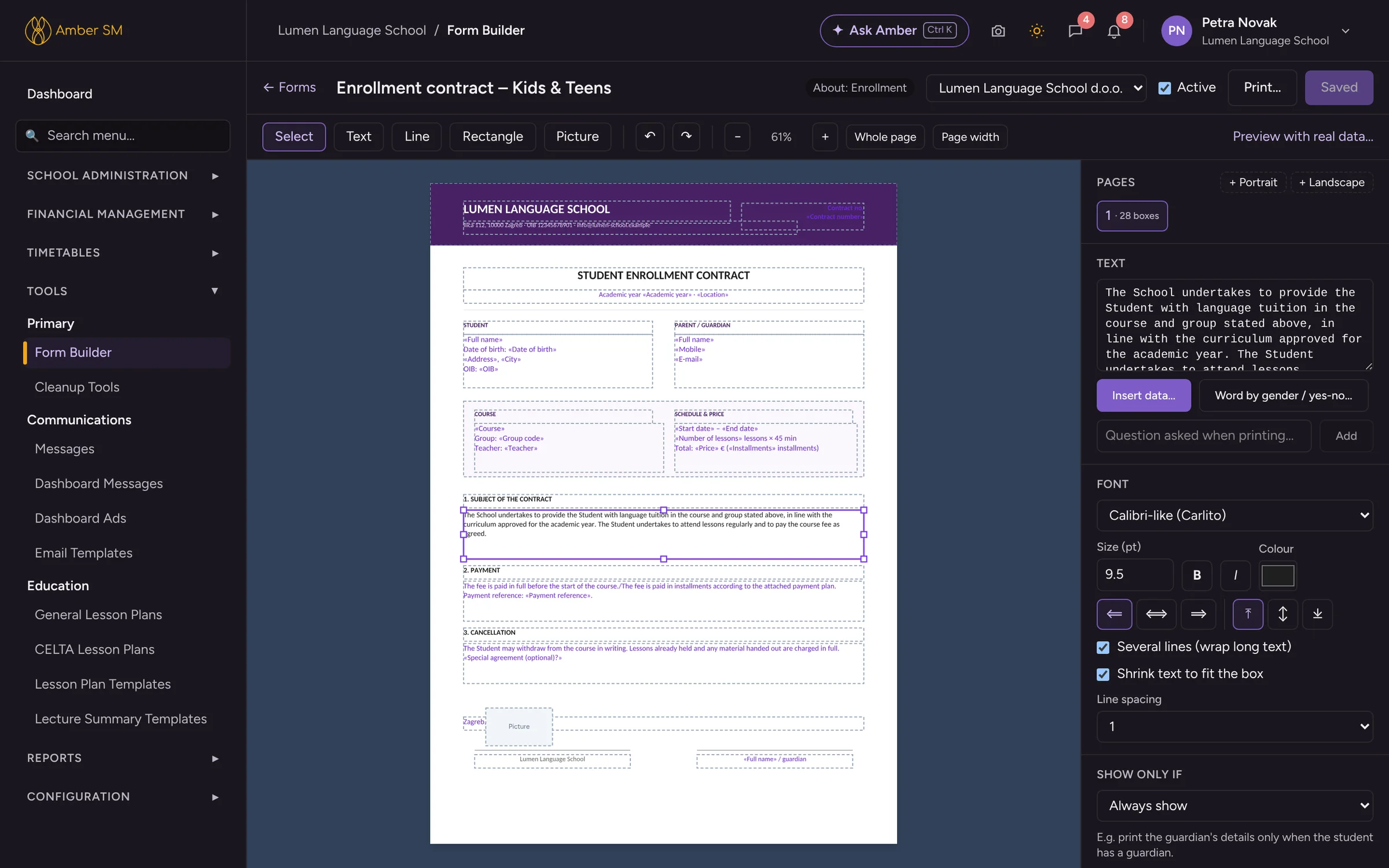
The Form Builder turns any document your school uses into a template. Upload it exactly as it looks today and place the data on it once. From then on, certificates for a whole group, contracts with the right number or any other form take a single click. Signatures are collected on phones and everything is filed in one archive, ready for an inspection.
What it does
Form Builder: your layouts, Amber’s data
Every document a school prints or sends can be built here, from certificates and diplomas to contracts, enrollment forms, statements, confirmations of attendance and payment plans.
Start from your own PDF
Upload the document you use today as the background and place the data on top. Your layout stays exactly as it is.
All the data you need
Pull in student, parent, course and company details, enrollment, contract and certificate numbers, instalments and exam results.
Smart text
Words change with gender, Amber can ask questions at print time, and some boxes appear only when needed, such as the parent block for minors.
One student or the whole group
Preview with real data, then print certificates or forms for the whole group as a single PDF.
Draw, align, zoom
Add text, line, rectangle and picture boxes on multi-page A4, zoom in up to 500 %, and line everything up with alignment tools and keyboard shortcuts.
Signature and stamp
Your school’s signature and stamp go on digital copies, and the signer’s drawn signature lands in the box you choose.
Rights per role
Decide who may do what. Your accountant, for example, can print forms without being able to change layouts.
Certificates with everything on them
Programme and level certificate labels, exam results, ministry verification and certificate numbers are all filled in automatically.
Signatures without printing
Document requests
Ask a group to sign or hand in whatever is still missing. A matrix shows you what each student already has.
Personal links, no login
Signers get a notification and, if you wish, an e-mail with a personal link. For under-18s, the parents sign.
Phone-friendly signing
Signers read, type their name, draw with a finger and accept. The same signature can be reused for the next document.
Audit page on every PDF
Each signed PDF records the typed name, the time, the logged-in person if there was one, and a fingerprint of the document.
One archive, nothing missing
Student document archive
Course and personal documents sit in one searchable archive, with a bulk uploader and an inbox for documents signed online.
Document groups
Define which documents each course requires. Online enrollment, document requests and reports all work from that same list.
Contracts and numbering
Every enrollment gets one contract, numbered automatically per contract type, with your signature and stamp on digital copies.
Missing documentation report
Amber checks every student against their course’s requirements, gives you a printable checklist and lets you request what is missing in one click.
- Starting a new school year? ✦ New year with AI copies all your counters to next year and updates the year in prefixes and classification codes as it goes.
- ✦ Analyse with AI on Missing Documentation shows you where paperwork is slipping, group by group and teacher by teacher.
Who uses it
- Office
- Prepares contracts and certificates, sends document requests and looks after the archive.
- Accountant
- Prints forms without being able to change the layouts.
- Students and parents
- Sign on their phones, wherever they happen to be.
For Croatia
For Croatian institutions
Ministry verifications (rješenja) are chosen automatically by programme, level and location. KLASA/URBROJ numbering, city names in the locative ("Izdano u Splitu") and the matična knjiga with log book pages are all built in. See fiscalization and eRačun.
Questions schools ask
Will our contract still look the same?
Yes. You upload your current document as the background, so your fonts, logos and legal text stay exactly as they are. Amber only adds the data.
Can parents sign without an Amber account?
Yes. A personal link works without logging in. It expires after 60 days and can be renewed.
Can you convert our existing templates?
In most cases, yes. As part of switching, our team can place your existing layouts into the Form Builder for you. Just tell us what you use during the demo.
Works hand in hand with
See your own school in Amber.
Give us 30 minutes. You tell us how your school works, and we show you what your day would look like in Amber.