
Teaching & lesson plans
The teacher’s register, in one window
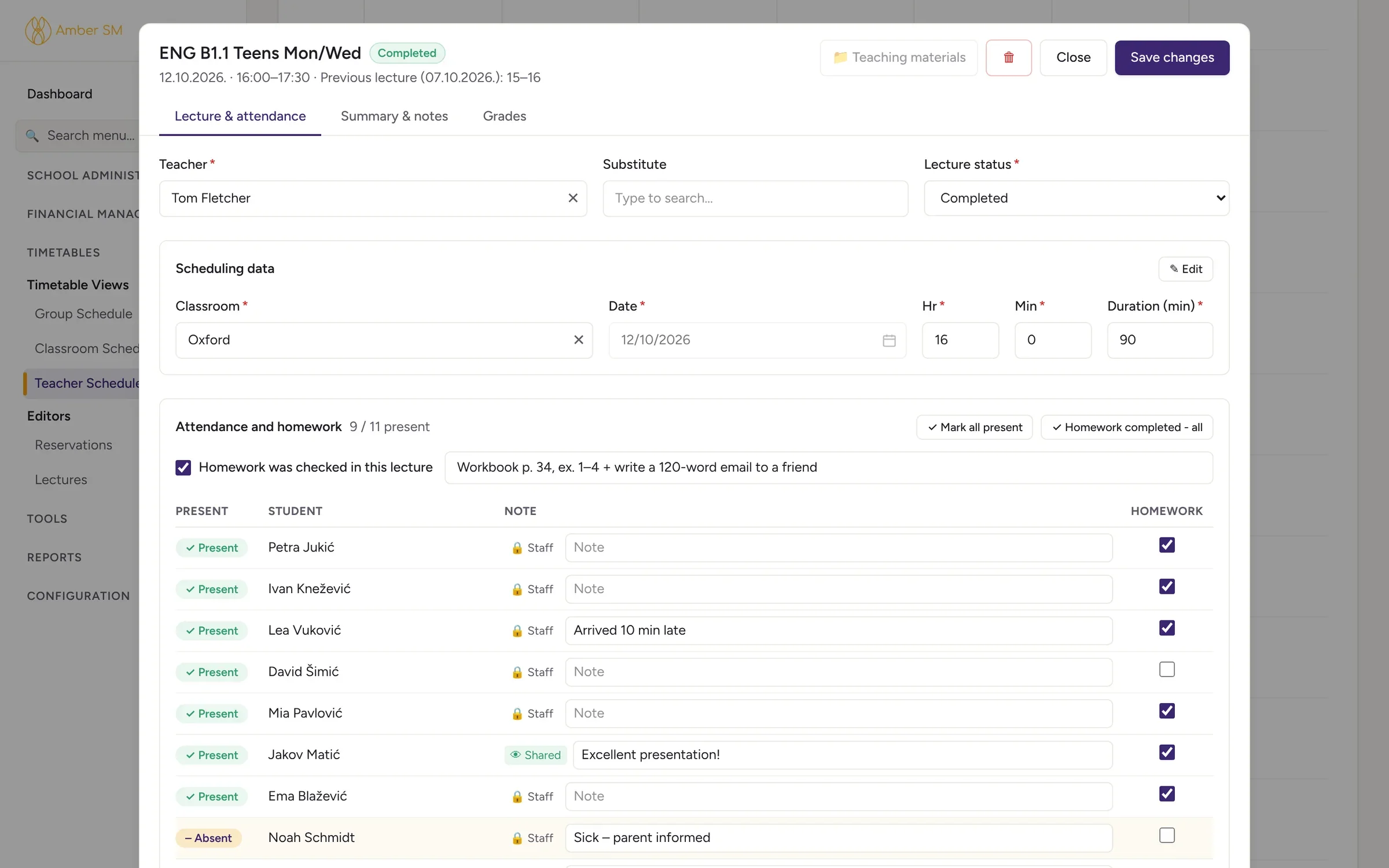
One click on the timetable opens the lesson. Teachers mark attendance, note the homework, write or insert the lesson summary, enter grades and open the plan. Everything the register and the inspector expect is there, and nobody fills in a paper register again.
What it does
Recording the lesson
Attendance in seconds
Tap "Mark all present" and add a note per student, either private or shared with the student and parents. A bell warns you when someone has missed the last three lessons.
Homework
Record whether homework was checked, what it was and who actually did it.
Automatic lesson numbers
Amber counts the "from–to" lesson numbers per lesson unit, just as the official register requires.
Summaries and private notes
Write the summary for the register, plus additional notes that only staff can see. Your school can also set a minimum length.
Lesson summaries without retyping
Summary templates per syllabus
Prepare the summaries for a coursebook once, then fill a whole group’s register with a single click.
Reuse what worked
Had a group whose summaries were spot on? Turn them into a list the next group can use.
Grades
Each group has one grade book, with a column for every test, a grade and/or percentage, and room for a note.
Lesson plans that live with the syllabus
General plans
Plan any subject with goals and outcomes, timed stages showing what the teacher and learners do, materials, assessment, homework and differentiation. Print it or save it as a PDF.
CELTA-style plans
Write aims, assumptions and anticipated problems, a full language analysis (meaning, CCQs, form, pronunciation) and a procedure with interaction patterns, built on familiar lesson frameworks.
Plan templates
Decide which plan each lesson of a syllabus uses, and teachers will find the right plan suggested when they open the lesson.
A shared library
Search the school’s plans, copy one into your own collection and see how often each plan gets used.
- ✦ Write from the lesson plan drafts the lesson summary straight from that lesson’s plan.
- ✦ Write with AI and ✦ Tidy up with AI help you build summary templates from book units or lesson plans.
- There is help with lesson plans, too. Ask the AI to draft a plan, turn old free text into stages, fit a plan to a different lesson length, check a plan or prepare a CELTA language analysis.
- The AI sees only the plan and your school’s lists, never student data, and it does not copy text from textbooks. You decide whether teachers may use it and how often.
Who uses it
- Teachers
- Their own lessons, register, grades and plans, on a computer, tablet or phone.
- Academic managers
- Set up the templates, plan libraries and rules for the whole school.
For Croatia
For Croatian institutions
Lesson numbers and summaries meet the register requirements for formal programmes, and every new plan starts with the introductory, main and final part (uvodni, glavni i završni dio).
Questions schools ask
Can teachers see only their own lessons?
Yes, if you want them to. Roles decide what each person sees, and teachers can be limited to their own lessons and groups.
Do students see the lesson summary?
Only if your school chooses to share summaries with the group. Additional notes always stay with staff.
Does AI help with lesson plans cost extra?
It comes with the Ask Amber AI module or the Complete plan and runs within their monthly AI allowance. If you prefer, you can switch it off for teachers. See pricing.
Works hand in hand with
See your own school in Amber.
Give us 30 minutes. You tell us how your school works, and we show you what your day would look like in Amber.