
Finance & invoicing
From bank statement to invoice, with almost no typing
Import your bank file. Amber records every payment it is certain about, suggests what to do with the rest, and then issues all the invoices in one go. Your accountant checks the work instead of typing it.
What it does
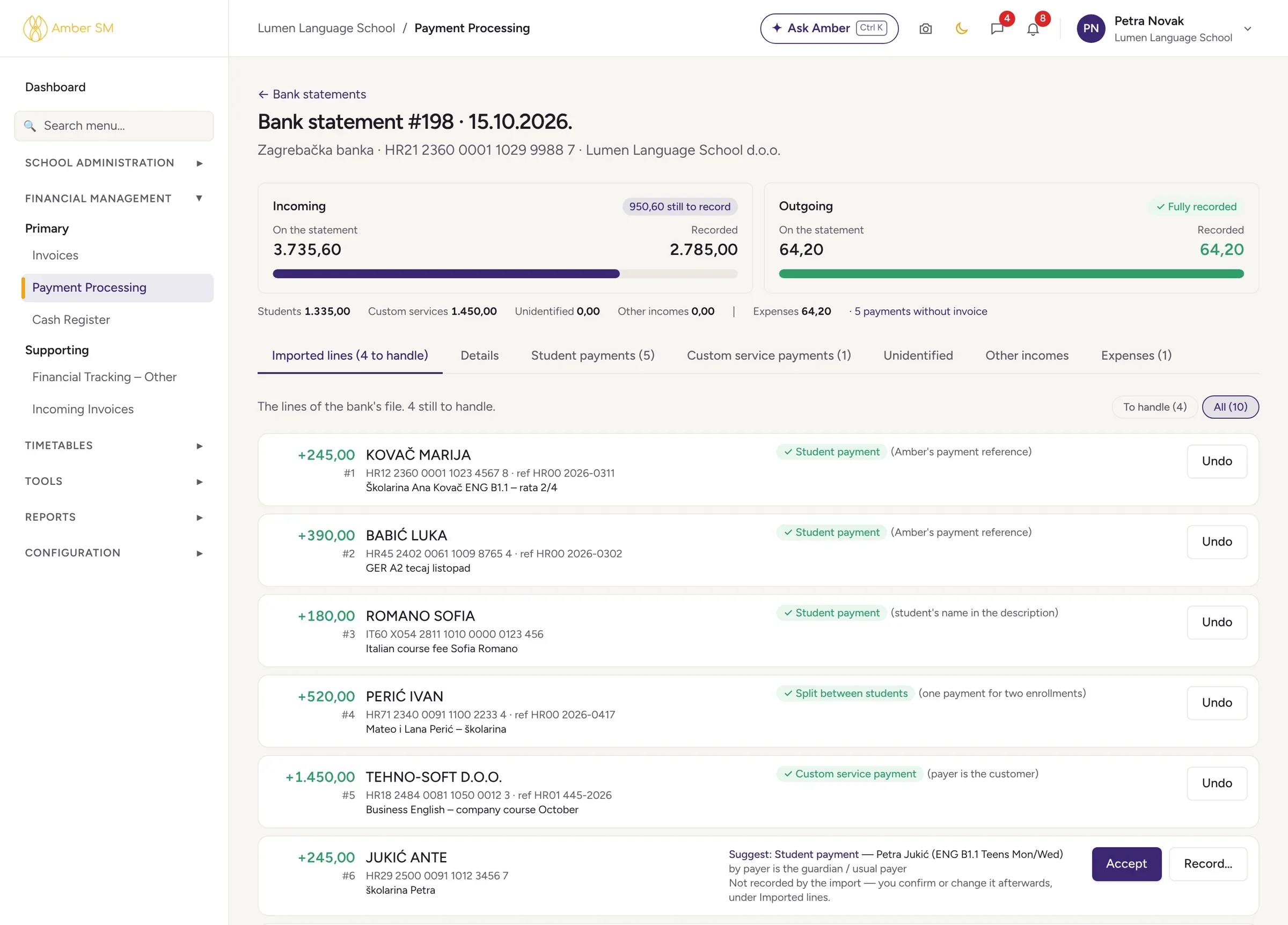
Bank statements that match themselves
Standard bank files
Amber reads camt.053 (XML), HUB3, MT940 and CSV. For CSV, you map the columns once per bank and Amber remembers them.
Safe automatic matching
Amber records a payment on its own only when it is sure and the amount makes sense. That means its own payment reference with a valid check digit, the contract number, or the student’s name with one open enrollment.
Suggestions for the rest
Everything else comes with a suggestion, even splitting one payment between siblings. For each line you can accept, record it differently, mark it as other income, expense or refund, or leave it for later. Every step can be undone.
Totals that turn green
The statement turns green the moment everything adds up, to the cent.
Invoices in bulk
Generate outgoing invoices
One run creates invoices for every bank-transfer payment that doesn’t have one yet, and you can preview each invoice first.
Cash register
Take cash or card at the desk and issue the invoice on the spot. Sell books and exam fees too, close the day and record your bank deposits.
Custom services
Invoice anything that isn’t a course fee, whether it’s books, room rent, exam fees or a company paying for several students.
Corrections done properly
Cancellation (storno) invoices are linked to the original both ways. Move a payment to the right student and its invoice goes with it.
Plans, companies and expenses
Payment plans
Split a price into a down payment and instalments in one step, print the payment slips and put the plan on the contract.
Company billing per lesson
When a company pays per lesson unit, Amber tracks cancellation fees and prepares a monthly statement that becomes an invoice in one click.
Other income and expenses
Every line from every bank statement is gathered together, with categories, supplier, venue and employee, and totals per category.
Supplier invoices
Keep incoming invoices with their PDF. If a supplier sends an e-invoice XML, Amber reads it and fills everything in for you.
Who uses it
- Accountant
- Handles statements, invoices, the cash register, closings and expenses.
- Office
- Takes payments at the desk and sets up payment plans and payment slips.
- Parents
- See in the portal what is paid and what is due, with the IBAN and reference ready to copy.
For Croatia
For schools in Croatia
Every invoice is fiscalized under Fiscalization 2.0, bank transfers included. Invoices for e-invoice customers become eRačuni, HUB3 statements and HUB-3A payment slips with barcode are supported, and the poziv na broj is matched automatically. Read more.
Questions schools ask
Does Amber connect directly to our bank?
Amber imports the standard statement files most banks provide (camt.053, MT940, HUB3 or CSV). Download the file from your online banking and drop it into Amber.
What if Amber matches a payment to the wrong student?
Amber records a payment by itself only when the reference, contract number or name is certain and the amount makes sense. Anything less certain stays a suggestion for a person to confirm, and any line can be undone.
Can we invoice companies?
Yes. Use custom services for anything a company buys, and special billing for groups a company pays for per lesson unit.
Works hand in hand with
See your own school in Amber.
Give us 30 minutes. You tell us how your school works, and we show you what your day would look like in Amber.