
AI in Amber
An assistant that does the work for you, trained in Amber
Amber’s AI is built into the screens where the work happens. It prepares an implementation plan and asks for your approval. If you are not happy with the result, Undo is one click away.
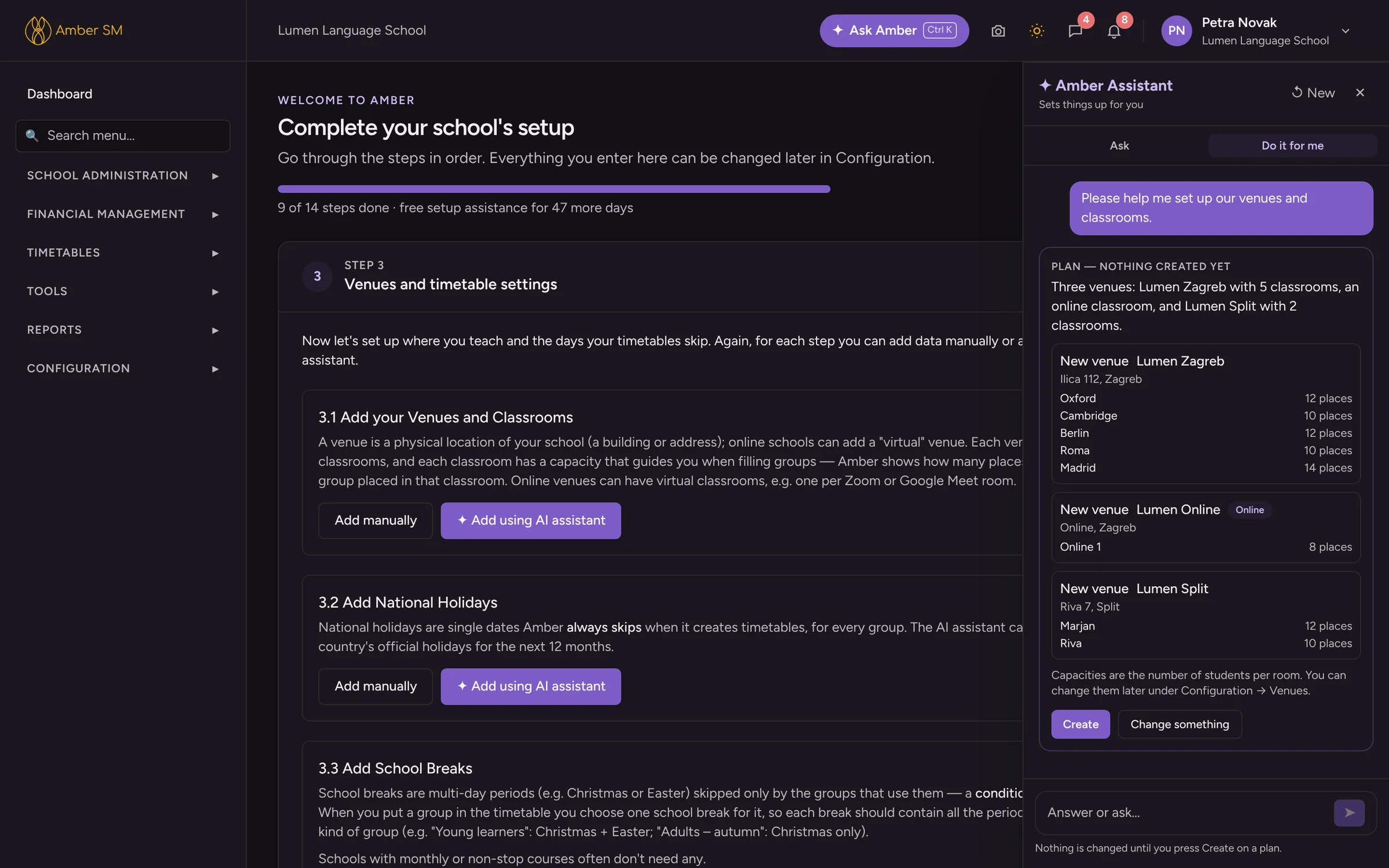
What the AI does for you
Sets up your school
Through a short conversation with you at the setup stage, it configures the system to match your business and educational needs.
Imports your contacts
It reads Excel, CSV or ODS files of up to 5,000 rows at a time, translates the columns into Amber’s structure and guides the import.
Makes administrative changes
Need to change a group’s timetable mid-semester? No problem: just ask the AI and it will reconfigure the group’s schedule for the remainder of the course.
Explains your reports
Amber has always been known for its advanced reporting. Now you can use ✦ Analyse with AI to better understand your reports over large data sets.
Helps teachers
Drafts and restructures lesson plans, writes lesson summaries, cleans up templates and monitors the quality of feedback given to students.
Answers how-to questions
Ask Amber replies step by step from Amber’s help articles and opens the right screen with Take me there.
How it works: plan, check, create, undo
Whenever the AI creates or changes something in your school, it follows the same four steps, so nothing happens behind your back.
You describe
Answer a few questions or write what you need, in your own words and language.
It proposes a plan
A plan card lists exactly what will be created or changed. "Change something" corrects it in plain words.
You press Create
Nothing is written to your database before that.
Undo if needed
One click removes what the plan created, as long as nothing uses it yet.
Privacy by design
Each AI job gets only what it needs.
- Ask Amber cannot see your school’s data, only specific information: your role, country, available features and the screen you are on.
- When assisting teachers with lesson plans and similar, it sees only the plans themselves, never student data.
- When analysing reports, it sees only numbers, never names or any other personal data.
Questions schools ask
Which AI does Amber use?
Amber uses Claude models from Anthropic through their commercial API. Under Anthropic’s commercial terms, data sent through the API is not used to train its models by default.
Can the AI make a mistake?
Yes, which is why it always shows a plan before acting, Amber checks rules such as clashes and duplicates itself, and Undo is one click.
Is AI help included?
AI-guided setup is free in your first 60 days on every plan. After that, AI comes with the Ask Amber AI module or the Complete plan, each with a monthly AI allowance. See pricing.
See your own school in Amber.
Give us 30 minutes. You tell us how your school works, and we show you what your day would look like in Amber.