
Enrollments & CRM
Turn more enquiries into enrolled students
Every applicant has a stage, a colleague who follows them up and a date for the next call. Each morning your front desk opens Amber and sees exactly who to ring today. And you finally see which marketing actually brings in students.
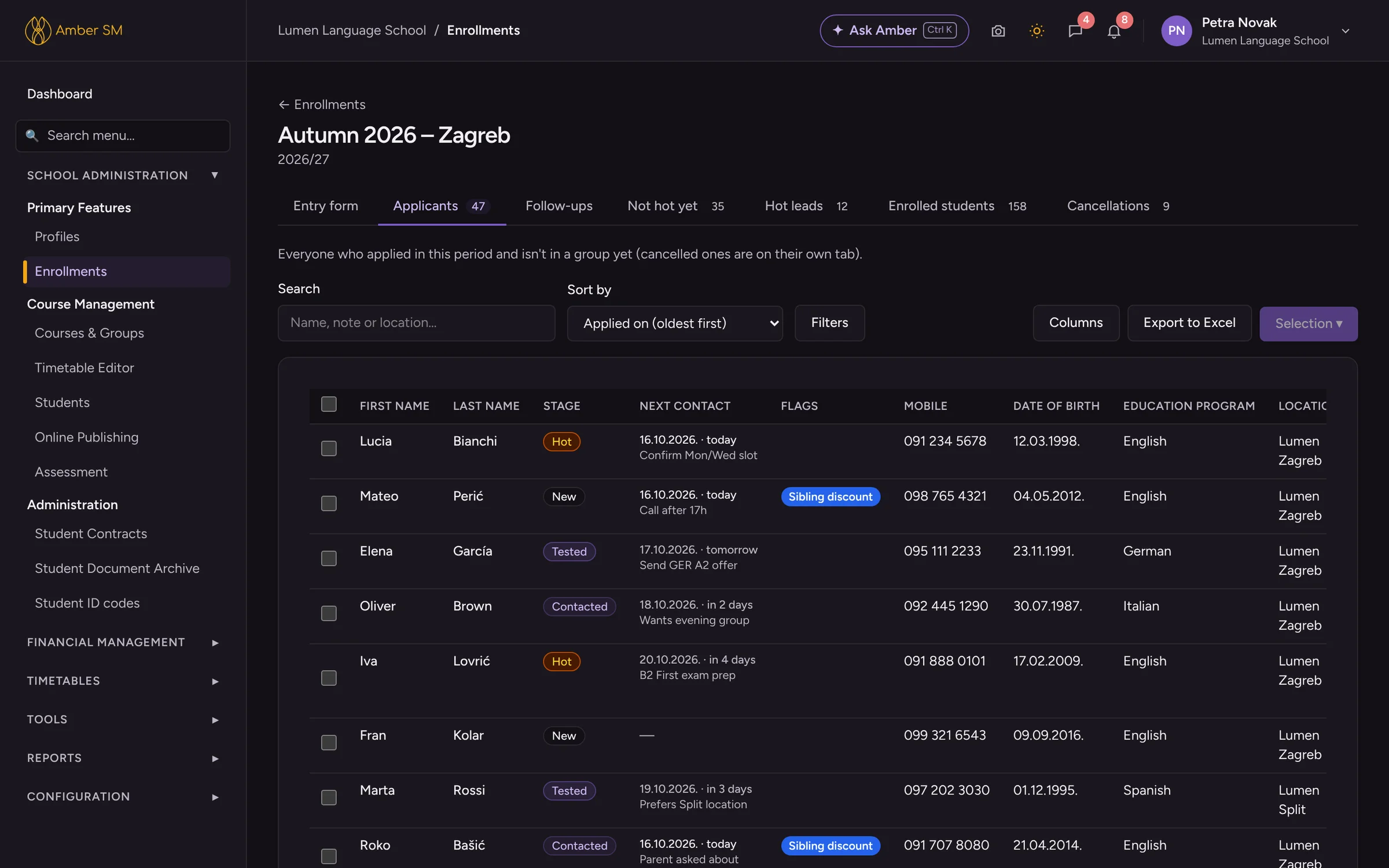
What it does
A follow-up system your office will actually use
Lead stages
Every applicant moves through New → Contacted → Tested → Hot and ends up Enrolled or Lost. One glance tells you where each of them stands.
Next contact
Set the date of the next call and add a note. Quick buttons for today, tomorrow, in three days or next week make it a two-second job.
My follow-ups
Each morning, one list shows everyone who is due today or overdue, across all enrollment periods. The phone numbers are right there to tap.
Comments that become tasks
Your team shares one history per applicant. Turn any comment into a task for a colleague, with a due date and a reminder.
From applicant to student in a few clicks
Enrollment periods
Keep each season or programme in its own box, such as "Languages Fall 2026" or "IELTS". A card counts the applicants, hot leads, enrolled and lost for you.
Add to group
See how full each group is (7/12) before you add anyone. If there is an unpaid earlier course or a serious flag, Amber warns you first.
Bulk actions
Select a batch of applicants and add them to a group, move them to another period or send them an e-mail from a template, all in one go.
Re-enrollment
Offer current students their group for next term. They confirm or decline right on their own dashboard.
Know which marketing works
Referral sources
Ask "How did you hear about us?" and give each answer a type (website, social media, paid ads, word of mouth…). Every source shows its conversion rate right beside it.
Timeslot demand
Applicants pick the days and times that suit them. A table shows you where the demand is, so you can open new groups where they will fill.
Enrollment funnel
See applications, enrolled and lost, how quickly your office makes first contact, conversion by source and the reasons people say no.
Lost reasons
Every lost applicant gets a reason from your own list. Over time you learn why people walk away as well as how many.
- ✦ Analyse with AI on the Enrollment Funnel explains your year: what changed, where applicants drop off and which sources deserve more of your budget. The AI only ever sees numbers, never names.
- Moving from another system? Import students and parents from Excel with AI. It recognises the columns, links parents and siblings, and one click undoes the whole import.
Who uses it
- Front desk and office
- They work from the daily follow-up list, write comments and tasks, and add students to groups.
- Owner and management
- You get the funnel report, referral sources and lost reasons, with AI to explain them.
Questions schools ask
Can we use our own lead stages and lost reasons?
The stages are fixed (New, Contacted, Tested, Hot, Enrolled, Lost) so your reports stay comparable from year to year. Everything else is yours to define: referral sources and their types, lost reasons, enrollment documents and timeslots.
Do online applications from our website arrive here too?
Yes. With online enrollment, every application from your website lands as an applicant in the right period, and the colleagues you choose get a task.
Can we send a placement test to an applicant?
Yes, if you use the NGPT online placement test. Send Placement Test e-mails the applicant a personal link, and when they finish, the level, score and result PDF come back to their record by themselves.
Works hand in hand with
See your own school in Amber.
Give us 30 minutes. You tell us how your school works, and we show you what your day would look like in Amber.